AR Drawing Paint Sketch Trace
- 4.8
- Rating
- 5.00M
- Installs
- Free
- Price
 Analysis by App-foxy
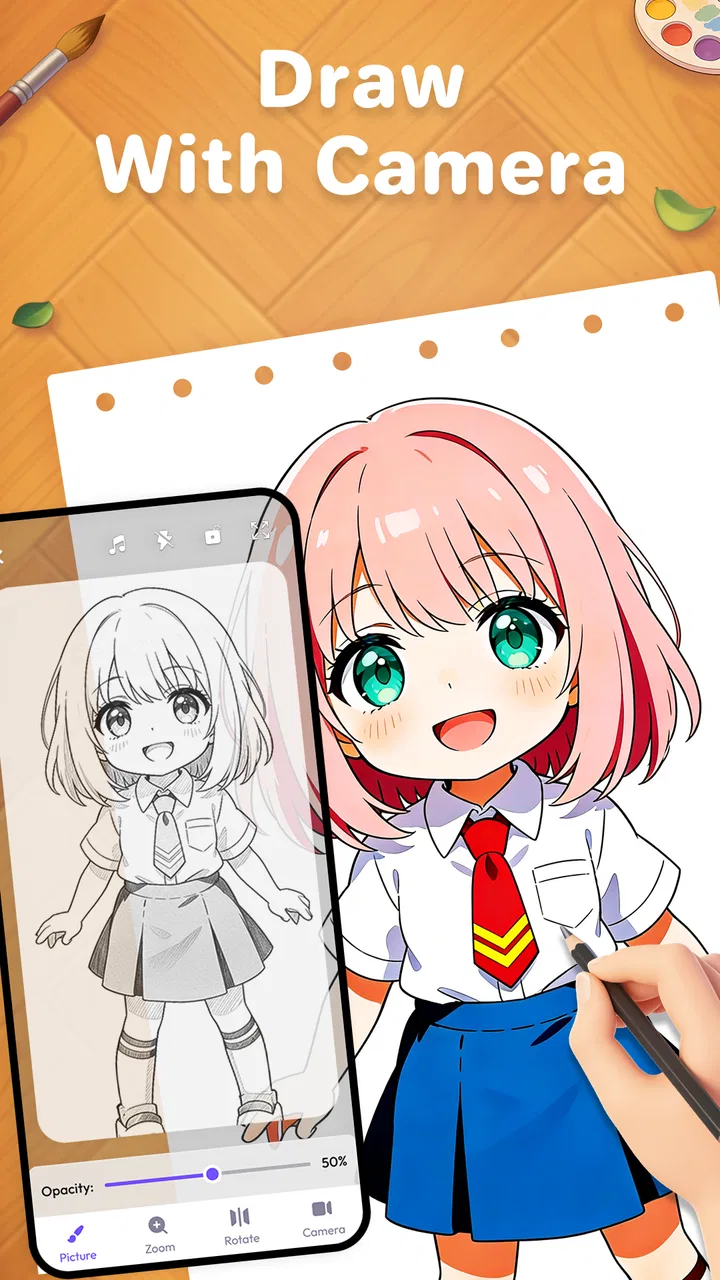
I found AR Drawing Paint Sketch Trace most interesting as a bridge between looking at an image and physically building it on paper. It is an Art & Design app from ideaFun - Pixel Art Coloring Games Color by Number that uses augmented-reality drawing guidance, tracing-style projection, and photo-to-sketch tools. I would not describe it as a complete digital illustration studio. Its appeal is more practical: it gives your hand a visual reference while you draw in the real world.
That distinction matters. If you want layers, brushes, masks, and detailed editing on a touchscreen, a conventional drawing app is the better fit. If you have ever wanted to sketch an anime character, copy a photograph, or make a simple drawing without knowing where to begin, this app offers a more approachable starting point. In my experience, its strongest quality is not that it magically draws for you, but that it reduces the intimidation of the blank page.
How the drawing experience works in everyday use
I like to treat the camera-guided view as a temporary scaffold rather than something that has to stay on for the whole drawing. Once I have traced the main outline, I can put the phone aside and add details from observation, which keeps the paper project feeling like my own. That practical rhythm also makes it easier to judge whether the setup suits me before I commit to a longer or more detailed sketch.
You May Also Like

 Blood Strike: 2.5 Anniversary
Blood Strike’s Loadouts Turn Every Drop Into a Tactical Gamble
A close look at Blood Strike’s custom loadouts: how fast access to signature weapons reshapes its battle royale rhythm, rewards preparation, and narrows the gap between fights.

 Pandora - Music & Podcasts
Pandora’s Music Is Easy to Start, but Harder to Recover
Pandora’s strength is its low-effort path from a seed to a station. Its weak spot is how much confidence it asks you to place in connection, setup, and quiet recovery.

 8 Ball Pool
 Is Built on Rivalries, Rematches, and Routine
A close look at the rivalries, rematches, shared routines, and unanswered safety questions that turn a quick pool match into a persistent mobile community.

 Samsung Music
’s Quiet Strength Is Playing What You Already Own
Its reach comes less from spectacle than from dependable access to a personal library. That simplicity is both the app’s strongest retention engine and its ceiling.

 AccuWeather: Weather Radar
AccuWeather Review: A Quick, Clear Forecast for Everyday Decisions
For everyday plans, the best forecast is the one you can understand quickly. AccuWeather makes rain timing, radar, and local conditions easy to act on, with a few trade-offs.

 Hill Climb Racing
Why Hill Climb Racing Still Turns Crashes Into One More Run
A tiny car, a bumpy hill and one more upgrade: Hill Climb Racing keeps resurfacing because its simple chaos makes every near-miss feel personal.
More From Our News Desk



Readable navigation for a first attempt
The app’s concept is easy to understand: choose an image or drawing subject, use the camera-based view to position the reference, and trace what you see onto paper. That direct relationship between the screen and the page is friendlier than opening a traditional art program filled with unfamiliar tools. A beginner can understand the purpose without first learning a complicated digital workflow.
The most useful way to approach it is to think in stages. First, prepare the surface and phone position. Then select an image that has clear shapes. After that, adjust your physical setup before worrying about artistic detail. This order prevents a common mistake: choosing an ambitious picture and blaming the app when the real problem is an unstable phone, poor lighting, or a page that is too small.
I also appreciate that the app’s focus is visual rather than text-heavy. For someone who finds long instructions tiring, a drawing reference can communicate more quickly than a written tutorial. This can help children, casual hobbyists, and people who are more comfortable learning by watching and copying. The experience still depends on being able to recognize controls and understand what the camera view is showing, but the central task remains concrete.
There is a useful difference between a projected guide and a normal image viewer. A regular gallery picture tells you what the finished subject looks like, while the AR approach encourages you to compare the reference with your paper as you work. That makes proportions easier to judge at a glance. It is especially helpful for broad outlines, facial placement, simple objects, and lettering practice.
My advice is to begin with a high-contrast image containing a few major shapes. A photograph with a busy background or delicate texture may look attractive on the phone but become confusing when converted into a tracing reference. Starting with a simple subject provides a clearer test of the workflow and makes the first session feel less demanding.
Motor control changes the experience
Tracing is often presented as an easy alternative to freehand drawing, but it still requires controlled hand movement. The app can show where a line should go; it cannot keep the pencil steady, hold the paper in place, or compensate for a phone that shifts. Users with limited fine-motor control may therefore find the guidance helpful but not effortless.
A practical setup can make a substantial difference. I would use a firm table, secure the paper with removable tape, and place the phone on a stable stand rather than holding it in one hand. This turns the activity from a three-part balancing act into a more manageable drawing task. It also makes it easier to pause without losing the alignment between the reference and the page.
For users who tire quickly, short sessions are more realistic than trying to finish a detailed illustration in one sitting. Work on the largest contours first, then stop before accuracy collapses. The app is well suited to this gradual approach because a reference can be revisited, while a rushed line on paper is much harder to correct. Someone supporting a child or an older relative could prepare the setup and let the artist concentrate on choosing lines and colors.
There is also a sensory consideration that is easy to overlook. The phone screen, camera view, paper, and surrounding room all compete for attention. Bright reflections or a dim surface can make the guide difficult to distinguish. A calm, evenly lit workspace is preferable to a crowded table or a place where people constantly move between the phone and the drawing area.
People who are sensitive to visual clutter may prefer converting a photo into a simpler sketch before tracing it. That workflow reduces the number of competing details and gives the eye a more organized structure. It is not a replacement for a fully adjustable image editor, but it can make a personal photo more usable as a drawing prompt.
Photo-to-sketch is more useful than it first appears
The photo-to-sketch function gives the app a second role beyond browsing ready-made drawing ideas. You can use a familiar subject, such as a pet, a favorite object, or a family scene, and turn it into something that feels personal. This is valuable for users who are motivated by recognition: drawing an image they already care about can be more inviting than selecting a random example.
However, a photograph is not automatically a good tracing template. A face partly hidden by hair, a pet lying in deep shadow, or a room with many overlapping objects may produce an unclear result. I get better outcomes by cropping the subject tightly and choosing a picture with a distinct outline. When the source image is visually simple, the sketch conversion becomes a guide rather than a pile of distracting marks.
One non-obvious use is preparing a reference for a physical craft. A simplified sketch can help with a greeting card, a notebook cover, a poster, or a small gift. The app is not limited to practicing portraits. Simple icons, plants, toys, and household objects can be easier to trace and may produce more satisfying results for beginners than complicated characters.
Anime drawing is another natural use case, but expectations should stay realistic. The app can help with placement and contour practice, yet it does not teach anatomy, expression, perspective, or personal style by itself. I would use it as a scaffold: trace a few examples, then redraw the same subject without the guide. That second pass is where the reference begins to become a genuine learning tool instead of a crutch.
A realistic afternoon scenario
Imagine a parent and child preparing a quiet weekend activity. The child chooses a simple character or turns a favorite toy into a sketch. The parent places the phone securely, checks that the page is visible, and helps with the initial alignment. The child can then focus on following one contour at a time, taking breaks between sections, and adding color afterward with ordinary art supplies.
In that situation, the app does something a standard coloring book cannot: it allows the subject to come from the child’s own interests. A normal drawing app offers more editing control, but it keeps the artwork inside the screen. A printed template is stable and easy to share, yet less flexible. This app sits between those options, using the phone for guidance while keeping the creative result physical.
For an adult, the same workflow could become a low-pressure evening hobby. A person who believes they “cannot draw” can use a photo of a coffee mug, plant, or bicycle and practice observing edges. The goal is not a perfect copy. It is learning to break a visible object into manageable lines, which is a useful habit even when the app is no longer open.
Where it differs from familiar alternatives
Compared with a standard digital sketching app, AR Drawing Paint Sketch Trace is less flexible but more connected to hand-drawn paper. Digital alternatives are usually better for undoing mistakes, resizing elements, experimenting with color, and building a polished final image. They are also easier to use when you want to draw while traveling because no physical surface or camera alignment is required.
Compared with a coloring app, this experience demands more active participation. You are not simply filling numbered regions or tapping completed shapes. You must position the device, coordinate your hand with the reference, and decide how much detail to keep. That makes it more rewarding for someone who wants to practice drawing, but less relaxing for someone seeking a completely passive activity.
Compared with a printed tracing sheet, the app offers more variety and the possibility of using personal photos. The trade-off is setup. Paper templates do not depend on a camera view or a phone stand, and they are often easier for very young children or users who find device positioning frustrating. I would choose this app when flexibility matters more than instant simplicity.
Its best audience is therefore quite specific: beginners, families, casual sketchers, and people who want a physical drawing outcome with digital assistance. I would skip it if your main goal is professional illustration, precise vector work, animation, or advanced photo manipulation. Those tasks need tools built around editing control rather than tracing guidance.
Situational access and the physical environment
The app can be useful in a classroom, workshop, or shared creative session, but the environment changes how well it works. A quiet table with reliable lighting is ideal. A crowded room, a reflective desk, or a place where the phone must be held continuously can make the same activity much harder. This is not a flaw unique to the drawing concept; it is a consequence of combining a camera view with a physical page.
For travel, I would treat it as a compact creative prompt rather than a fully portable studio. You still need a drawing surface and enough room to position the device. A small notebook may work for simple outlines, while detailed images benefit from more space. If you are drawing outdoors, glare and changing light can affect the view, so a shaded area is likely to be more comfortable than direct sunlight.
The app’s Everyone content rating makes it suitable to consider for a broad household audience, including children using it with sensible supervision. That does not remove the need for an adult to help with device placement, screen time, and the choice of images. The physical activity is generally more collaborative when a younger user is still learning how to stabilize the setup.
It is also worth considering who controls the source photo. Turning a personal image into a sketch can be meaningful, but users should choose pictures they are comfortable using in the app and avoid treating private images casually. The most inclusive workflow is one that lets the artist select a clear, appropriate subject without pressure to share the result publicly.
Remaining barriers and practical friction
The biggest barrier is alignment. The drawing guide is only useful when the phone and paper remain in the intended relationship. Even a small shift can make a carefully followed line land in the wrong place. I would not begin a detailed portrait until the setup has been tested with a few simple marks. This quick trial can save a great deal of frustration.
Another limitation is that tracing may create a false sense of progress. Following an outline can produce a recognizable picture quickly, but it does not automatically improve freehand skills. To get lasting value, I would alternate between guided drawings and memory or observation sketches. The app is strongest as a confidence builder and practice aid, not as a complete art curriculum.
There is also a cost consideration. The app is free to install, while optional purchases range from less than a dollar to amounts approaching a hundred dollars per item. That wide range makes it important to understand which parts of the experience you actually need before buying anything. I would begin with the free experience, test whether the physical workflow suits you, and only then consider an optional purchase for a specific purpose.
Its current version is 1.4.15, and it runs on Android devices using version 5.0 or later. That broad system requirement makes it approachable for people who do not own a recent phone, although the practical quality of a camera-based drawing session will still depend on the device, screen, and surrounding light. A phone that struggles to show a stable, clear view may make the experience feel less accessible than the operating-system requirement suggests.
The app has reached over a million installs and holds a 4.8 average from around fifty-eight thousand ratings, which suggests that the basic concept resonates with many users. I would still treat popularity as a starting signal rather than a guarantee. The important question is whether you enjoy drawing on paper while looking through a phone. If that physical coordination feels annoying, a conventional drawing or coloring app may suit you better regardless of its popularity.
Who should try it, and who should choose something else
I recommend it to a beginner who wants visible guidance without committing to a formal art course. It is also a good match for a parent looking for a customizable creative activity, an adult returning to sketching, or someone who wants to turn personal photos into handmade artwork. The combination of anime-oriented drawing, AR guidance, and photo conversion gives it more personality than a basic digital canvas.
I would be cautious about recommending it to someone with severe difficulty holding a device steady unless another person can help with setup. I would also point experienced artists toward a layered drawing app, because tracing guidance will feel restrictive once you need precise edits, repeatable shapes, or complex compositions. Users who dislike screen-based activities may prefer printed references and traditional instruction instead.
One helpful compromise is to use the app only at the beginning of a project. Trace the main silhouette, put the phone away, and finish the details independently. This reduces screen dependence, keeps the physical artwork central, and turns the guide into a planning tool. It also makes the app more suitable for users who become tired when switching attention between a display and paper.
My inclusive verdict
After using it as a drawing aid rather than judging it as a full art suite, I see a clear and useful purpose. It makes the first step less intimidating, supports personal photo-based projects, and gives families a way to create something tangible together. Its accessibility is strongest when the environment is prepared thoughtfully: stable phone placement, good lighting, a clear image, and enough time for breaks.
The remaining barriers are real. Fine-motor demands do not disappear, alignment can be fiddly, and the app cannot replace instruction or advanced editing tools. The optional purchase range also means I would avoid spending immediately. Start with a simple subject, test the setup, and decide whether the process feels comfortable before expanding your use.
For me, the deciding strength is the way it connects digital guidance with a paper result. It is best understood as a supportive tracing companion, not an automatic artist. If that sounds like the kind of help you want, the free app is worth trying. If you need professional control, effortless portability, or a completely hands-off coloring experience, another category of drawing tool will be a better choice.
Developed by ideaFun - Pixel Art Coloring Games Color by Number and released on August 20, 2024, it is free to start and aimed at everyone. With its approachable concept and broad device compatibility, I would recommend giving it a short, low-pressure test using a simple photo or object. That first session will tell you more than the feature list: either the camera-guided workflow clicks, or you will quickly know that a regular drawing app is the more comfortable companion.
FAQs for AR Drawing Paint Sketch Trace
01What is AR Drawing Paint Sketch Trace?
AR Drawing Paint Sketch Trace is an innovative app that utilizes augmented reality (AR) technology to help users create and trace drawings. By projecting images onto a surface using your device’s camera, it allows you to trace and sketch with ease, making it perfect for artists and hobbyists alike.
02How does the augmented reality feature work in the app?
The app uses your device’s camera to overlay images onto real-world surfaces. You select an image, position it on a surface through your screen, and then trace over the image with a pencil or pen. This AR feature provides an interactive and immersive drawing experience, making it easier to learn and improve your skills.
03Is AR Drawing Paint Sketch Trace suitable for beginners?
Yes, the app is designed to be user-friendly and is suitable for users of all skill levels, including beginners. It provides tutorials and step-by-step guidance to help new users understand the app's features and improve their drawing skills. The AR technology simplifies the process, making it accessible for everyone.
04What devices are compatible with AR Drawing Paint Sketch Trace?
The app is compatible with most Android and iOS devices that support AR functionality. It requires a device with a camera and the ability to run AR applications smoothly. Check the app’s specifications on the download page to ensure compatibility with your specific device.
05Are there any in-app purchases or ads in AR Drawing Paint Sketch Trace?
The app may include in-app purchases to unlock premium features or additional content. There might also be ads, but these can typically be removed through a one-time purchase. It's recommended to review the pricing details and user reviews on the app store to understand any costs involved.
Pros
- Enables easy tracing with AR technology.
- Wide variety of templates available.
- User-friendly interface for beginners.
- Supports freehand drawing alongside tracing.
- Works seamlessly on most devices.
Cons
- Requires a well-lit environment to function.
- Limited features in the free version.
- Occasional lag on older devices.
- Subscription needed for premium templates.
- No offline mode available.

AR Drawing Paint Sketch Trace
Gallery